MCP Gateway on Azure APIM: Lessons & Tips
Azure API Management service also known as APIM is a gateway that centralizes authentication and request routing for backend services, simplifying security and access control. In the age of LLMs, MCP Servers and Agents, It is a crucial component for managing access and ensuring safe access to the benefits of generative AI.
Every office building I have worked in solves visitor access the same way. You show your ID once, at the front desk. They check it against a list, print a badge with your name on it, and from then on every door inside trusts the badge rather than asking you for ID again.
I wanted exactly that for MCP servers. I had three small tools, a Tshivenda translator, a summariser and a classifier, and I did not want to write OAuth code three times. More importantly, I did not want the next ten tools to each carry their own slightly different, slightly wrong copy of it.
So the plan was a reception desk: Azure API Management in front, Microsoft Entra ID as the list of who is allowed in, and three plain FastMCP servers behind it that never see a password or a token. The desk checks the token, stamps the caller’s identity onto the request as headers, and the servers simply read the badge.
The pattern is not new. What surprised me was how many places the official path quietly led somewhere else, and how differently each MCP client behaves at the door.
Getting Started#
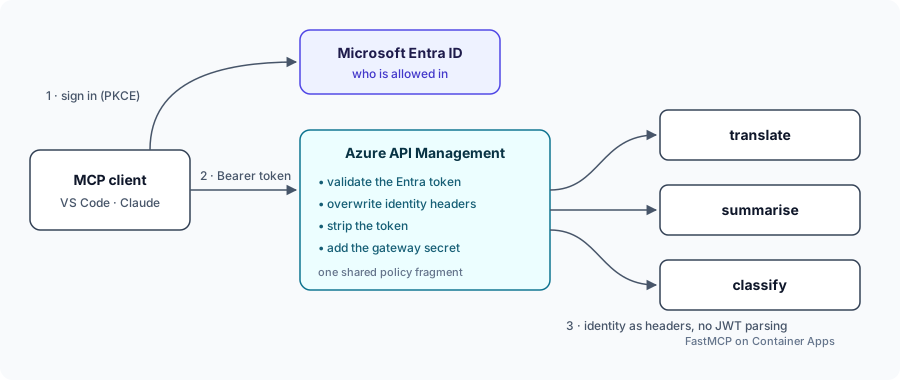
The flow is pretty straightforward. A client signs in via Entra and hands its token to APIM. A single, shared policy fragment handles the validation. Crucially, it overwrites any spoofed identity headers the caller might have tried to sneak in, strips out the token, and forwards the request downstream with a secret that only the gateway knows. Because the downstream servers never have to parse a JWT, adding a fourth server literally takes one line in my Bicep file. Zero new auth code required.
NB: Please evaluate whether this approach meets your security and compliance requirements before adopting it. For mission critical apps, it might be worthwhile to do additional RBAC (Role-Based Access Control) checks in the app to ensure that only authorized users can access the MCP servers.
The Docs Were Wrong, Quietly#
APIM has a first-class resource type for MCP servers, still in preview under api-version 2025-09-01-preview. The docs, the REST spec examples and the Bicep type definitions all agree on how to describe a passthrough server: a transport type of streamable, an endpoints array with one entry named message, and a serviceUrl pointing at your backend.
The live service disagrees with all three, and it does so politely. The array is rejected outright, which is at least honest. Switch to a dictionary keyed by message and the deployment succeeds, the portal lists your server, and a tools/list call returns a perfectly valid, perfectly empty list.
That empty list was the clue. It carried none of my backend’s headers, so APIM was answering on its own: it had created a REST-backed MCP server, the kind whose tools you define inside APIM, and it never forwarded a single request.
I stopped reading documentation and started asking the service directly:
- Read back what was stored. After every PUT, a GET showed
transportTypehad simply vanished. Silently dropped fields are the service telling you it does not know them. - Make the error name the type. Sending a deliberately wrong value, an array where an object belongs, produced
Cannot deserialize … into McpFederationContract, which is the real schema leaking through an error message. - Let the portal build one, then read it. I created a single server through the portal’s “Expose an existing MCP server” wizard and fetched it with
az rest. That was the ground truth.
The working shape differs from the docs in three ways: the endpoint key is mcp, not message; the backend lives in a separate backends resource referenced by backendId; and there is no transport type at all.
mcpProperties: any({ endpoints: { mcp: { uriTemplate: '/mcp' } } })
backendId: backend.name   // #disable-next-line BCP037, not in the Bicep types yet
The portal has a tell, once you know to look for it. In the MCP Servers blade, a working passthrough server shows Source: MCP server. The broken one shows Source: API.
Metadata Resources#
A modern MCP client does not need to be told where to log in. It calls the server, gets a 401, and reads a pointer in the WWW-Authenticate header to a small JSON document, the protected-resource metadata from RFC 9728. That document names the resource and the authorization server, and the client takes it from there.
HTTP/1.1 401 Unauthorized
WWW-Authenticate: Bearer resource_metadata="https://mcp.example.com/.well-known/oauth-protected-resource/tshivenda/translate/mcp"
My first version served one metadata document for the whole gateway, with resource set to /tshivenda. VS Code connected to /tshivenda/translate/mcp, saw that the two did not match, and threw the document away. It then assumed the gateway itself was the OAuth server and asked me to type in a client ID, which looks like a missing feature but is actually a mismatch.
The fix was one metadata document per server, served from a path-aware well-known URL, with resource equal to the exact URL the client was given. After that, VS Code recognised Entra, used its built-in Microsoft sign-in, and needed no app registration at all.
Claude was stricter, and taught me what an Application ID URI really is. I had always treated it as the API’s address. It is not: it is a name Entra uses to look up which app a token request is for. api://<app-guid> points nowhere, and that is fine.
The twist is that MCP clients send the server’s actual URL as the OAuth resource parameter (RFC 8707). Entra looks that string up among its Application ID URIs, finds nothing, and fails with AADSTS9010010. So each MCP URL has to be registered as an extra name on the gateway app, making the name and the address the same string. All of the names are aliases, and every one of them produces an identical token.
There is a catch. Entra only accepts https names on a domain your tenant has verified, so nobody can claim to be someone else’s API. That rules out *.azure-api.net permanently, which meant a custom domain on APIM, a Let’s Encrypt certificate issued through a DNS challenge, and Key Vault to hand it to APIM, because the free managed certificate is not available on the v2 tiers.
One more thing broke behind the desk itself. The MCP Python SDK protects against DNS rebinding by accepting only localhost in the Host header, so every proxied request came back as 421 Invalid Host header. The fix keeps the protection on and adds the container’s own hostname to the allowlist.
Disclaimer…#
Right now, this setup is a great working reference, but it is definitely not production-ready. If I were deploying this for real, I would tighten up a few things:
- Lock down the network: The backend Container Apps currently still have public ingress and are only protected by the shared secret header injected by APIM. I’d move them to an internal VNet alongside APIM so that the secret becomes a second layer of defense rather than the only one.
- Check permissions, not just identity: The current APIM policy validates the token, but it doesn’t check for an
mcp.invokescope or specific app roles. Per-tool permissions should ideally map to Entra app roles. - Use the On-Behalf-Of flow: If a downstream tool needs to call Microsoft Graph or a database on the user’s behalf, it should use the OAuth On-Behalf-Of (OBO) flow with the validated token, rather than just blindly passing the raw token around.
- Automate cert renewals: Let’s Encrypt certs expire every 90 days. I would set up a cron job or scheduled pipeline to run
up.shmonthly. Since the script is idempotent, it would naturally renew the cert when needed without breaking anything else.
Ultimately, the centralized gateway approach is totally worth it. But getting every client and every Azure resource to play nice together definitely took a solid day of trusting what the services did rather than what the documentation said.
Sources#
- Manage MCP servers programmatically in API Management (Microsoft Learn)
- Connect and govern an existing MCP server (Microsoft Learn)
- Configure a custom domain for API Management (Microsoft Learn)
- Authentication for connectors (Claude docs)
- Add a connector that isn’t in the directory (Claude docs)
- RFC 9728: OAuth 2.0 Protected Resource Metadata
- RFC 8707: Resource Indicators for OAuth 2.0